





A redefined desktop AI companion: Loona DeskMate
January 08, 2026
CES has long been where consumer tech trends become real products. In 2026, one theme is hard to miss: AI is moving off the screen and into physical spaces—especially as “companions” designed to be present in daily life, not just summoned on demand. The Verge notes CES 2026 is packed with AI companions and assistant robots, signaling a shift toward tangible, emotionally responsive devices.
Against that backdrop, KEYi Tech is showing a new approach to desktop intelligence: DeskMate, an iPhone-powered desktop AI companion designed to sit on your desk, stay available, and support work without constant prompting.
Introducing Loona DeskMate : A New Kind of Desktop AI Companion
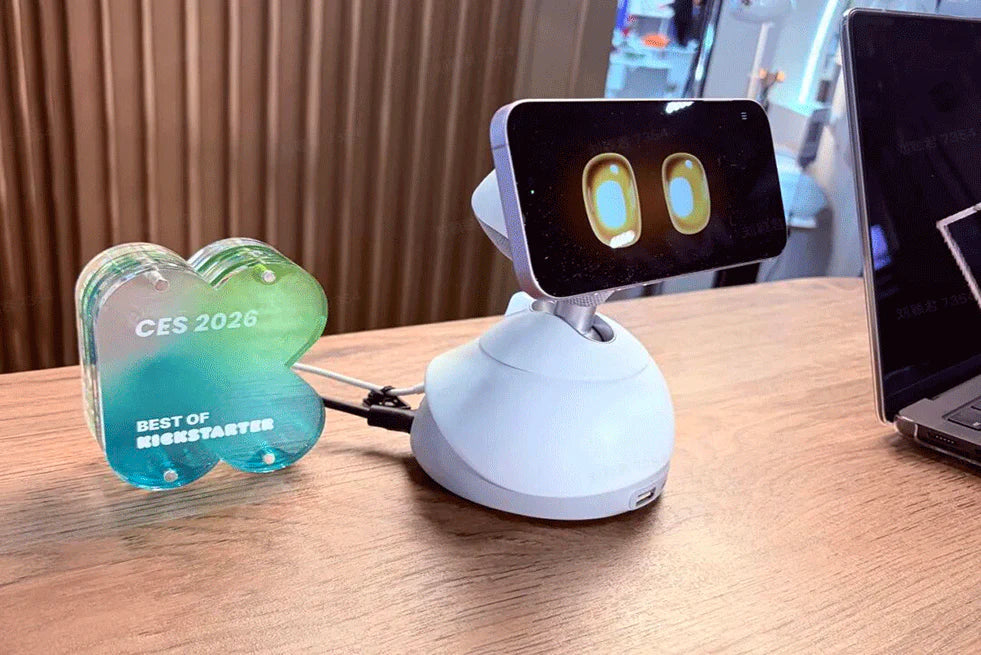
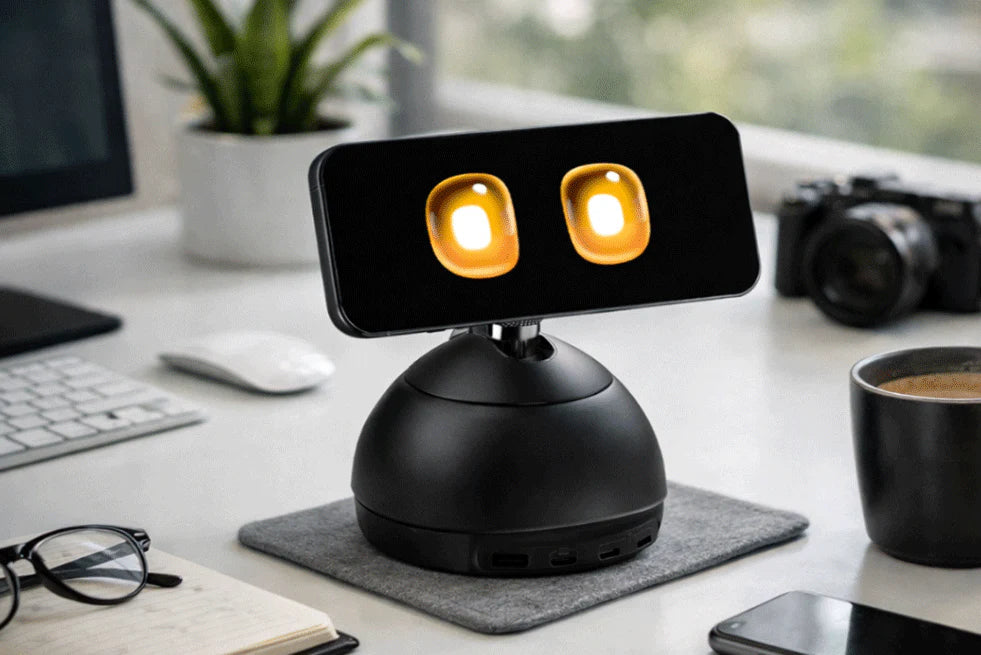
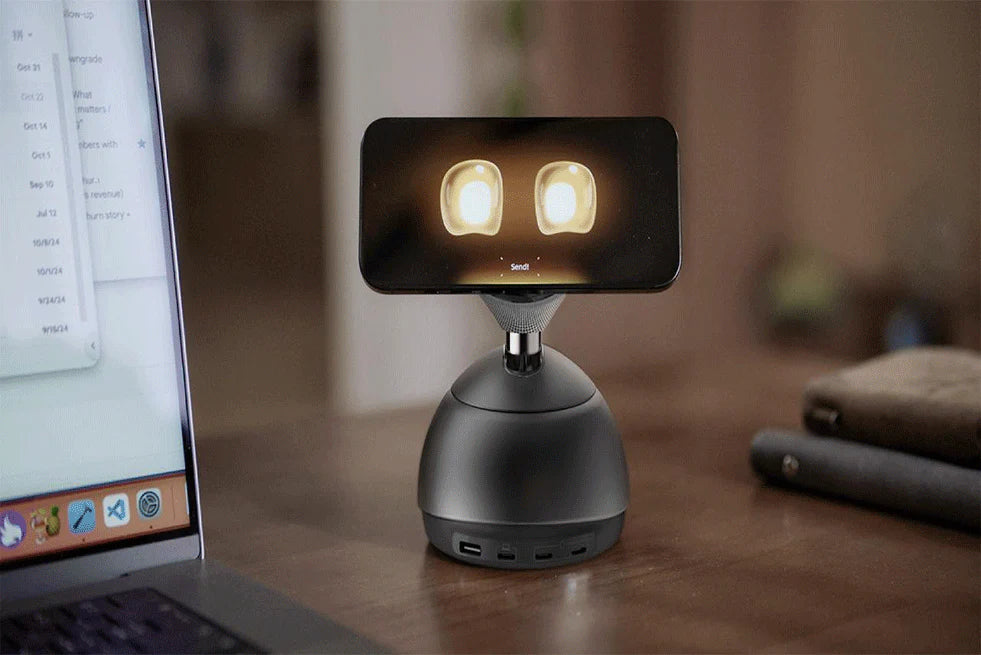
DeskMate is best described as a desktop charging hub that turns your attached iPhone into an AI companion. Instead of building a standalone robot with its own screen, camera, and microphones, DeskMate leverages the hardware you already own—your iPhone becomes the “face” and sensor suite, while DeskMate provides a physical presence, power, and motion.
According to both The Verge and MacRumors, DeskMate includes:
A MagSafe charging stand that rotates and tilts to keep the iPhone facing you during conversations
Multiple ports (reported as three USB-C and one USB-A) for a desk-friendly charging setup
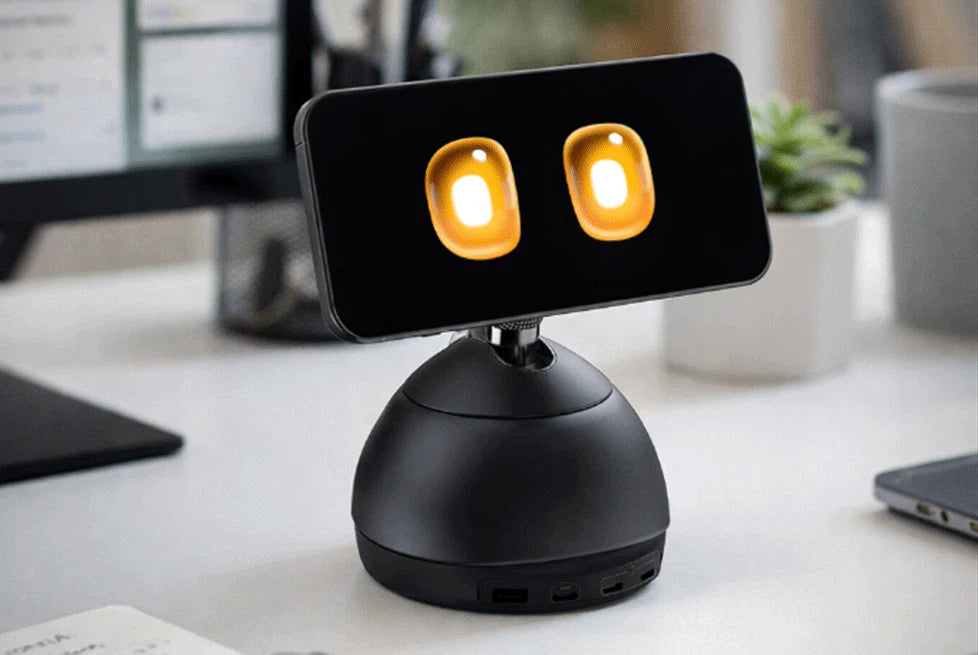
An experience designed to feel more “alive,” including cute animated eyes displayed on the iPhone screen
This “phone-as-brain” approach aims to reduce clutter and lower the barrier to adopting an embodied assistant—DeskMate can replace a charger you already keep on your desk, rather than adding a whole new device category.
Loona DeskMate is expected to launch in May.
Lock in VIP pricing!
Enjoy pre-sale discounts!
Built for Workflows: From Slack to Meetings
DeskMate isn’t positioned as a novelty desk toy. It’s designed to plug into real workflows.
Media coverage highlights practical capabilities like Slack integration and meeting assistance, while MacRumors notes connections to workplace tools such as Slack, email, and calendar apps, plus the ability to support meetings with notes or summaries.
On the company side, KEYi Tech frames DeskMate as “always there” and context-aware, emphasizing attention and emotional state so it can stay quiet during focus time and step in when support is helpful.
In other words, the promise isn’t “one more AI app”—it’s a calmer, desk-native assistant that fits how work actually happens: constant context switching, micro-tasks, and frequent interruptions.
Why This Design Matters: “Embodied AI” for Everyday Desk Life
Most assistants today live inside apps and browser tabs. KEYi Tech’s thesis is that presence changes behavior: when the assistant is physically there—able to look toward you, “wait,” and respond softly—interaction becomes more natural.
KEYi Tech describes DeskMate as an AI desktop companion meant to remain present in your workspace, with multimodal interaction (including vision and audio) to enable more fluid conversations at the desk.
That lines up with the broader CES 2026 shift: AI products that aim to feel less like tools you command and more like companions you collaborate with.
Conclusion
CES 2026 makes one thing clear: AI is quickly becoming more physical, more present, and more human-centered. With the debut of Loona DeskMate, KEYi Tech showcases a new kind of desktop experience—an iPhone-powered AI companion that blends everyday utility (charging and desk setup) with natural interaction and workflow support. As interest in embodied AI accelerates, DeskMate signals a meaningful step toward “always-on” assistance that fits seamlessly into real work and life.
FAQ
Is Loona DeskMate a standalone robot?
No—DeskMate is designed to use an iPhone as the display, camera, and microphone, while providing a rotating MagSafe stand and charging hub hardware.
What can Loona DeskMatee do at work?
Coverage mentions Slack integration and meeting assistance, and support for workplace tools like email and calendar apps.
When will Loona DeskMate launch?
Reportedly, KEYi Tech plans a crowdfunding launch in March.
LOONA DeskMate : An iPhone-Powered AI Desk Robot
January 07, 2026
On January 6, 2026, as CES 2026 kicked off in Las Vegas, KEYi Tech—the company behind the LOONA companion robot—pulled the wraps off a new kind of “robot assistant” called LOONA DeskMate. Instead of building yet another standalone gadget with its own screen, cameras, and microphones, DeskMate is designed to turn your iPhone into the face (and brain) of a desktop AI companion, while also functioning as a charging hub.
The pitch is simple: your phone already has premium sensors, a great display, and always-improving on-device performance. DeskMate aims to “embody” that power—literally—by giving your iPhone a friendly presence on your desk that can look at you, respond naturally, and help with everyday work routines.
What Major Tech Sites Are Saying About LOONA DeskMate
CES launches live or die on third-party validation. Here’s how four prominent tech publications (and one broader CES trend piece) are framing DeskMate right now:
The Verge: A clever iPhone-powered robotic assistant
In its CES hands-on coverage, The Verge calls DeskMate a novel take on the AI assistant category: a charging hub that automatically activates an AI companion app and uses the phone to avoid extra hardware, while the stand rotates and tilts to keep “eye contact.” The Verge also notes the port selection (3× USB-C, 1× USB-A).
For detailed coverage, please visit : https://www.theverge.com/tech/856077/yoona-deskmate-iphone-robot-companion-ai-assistant
MacRumors: “Gives your iPhone AI personality,” plus workplace-tool integrations
MacRumors similarly focuses on the idea that DeskMate makes an iPhone feel like a character-driven assistant, emphasizing the rotating/tilting MagSafe stand and the companion app experience. It also highlights productivity angles—calendar, reminders, Q&A—and mentions integration with workplace tools like Slack, email, and calendar apps, plus meeting note/summarization concepts.
For detailed coverage, please visit : https://www.macrumors.com/2026/01/06/deskmate-magsafe-ai-charger-iphone/
The Gadget Flow: An “embodied AI workmate” built around intent, state, and emotion
The Gadget Flow frames DeskMate less as a gadget and more as an “embodied AI workmate,” spotlighting the product’s positioning around understanding intent, adapting to your focus/state, and tracking emotion over time, along with multimodal interaction and tool awareness (screen/clipboard/email/calendar/Slack/meetings).
For detailed coverage, please visit : https://thegadgetflow.com/product/loona-deskmate-ai-workmate/
9to5Toys: A mechanized MagSafe stand that turns iPhone into a mini desktop AI bot
9to5Toys leans into the hardware magic trick: drop your iPhone onto MagSafe and it becomes a “mini desktop AI bot,” with the stand able to tilt/turn to face you. The report states that while there are many similar devices on the market, few are like DeskMate, which automatically transforms an iPhone into a mini desktop AI robot simply by placing it on the MagSafe magnetic pad.
For detailed coverage, please visit : https://9to5toys.com/2026/01/06/ces-2026-this-mechanized-magsafe-stand-transforms-iphone-into-a-personal-ai-robot-assistant/
Why CES 2026 Is the Perfect Stage for Desk Companions
CES 2026 has been packed with AI-powered devices, but one clear theme is AI becoming physical—moving off the screen and into products designed to “exist” with us in daily life. The Verge framed this as a shift toward AI companion robots and pets, where emotional engagement can matter as much as task automation. DeskMate is explicitly called out as part of this trend: it has practical features (like Slack and meeting support), but the companion experience is a central part of its appeal.
In other words: DeskMate isn’t just competing with chargers—it’s competing with the growing idea that AI should feel present, not buried inside apps and menus.
Key Features: What DeskMate Claims to Do
Based on early coverage and KEYi Tech’s own positioning, DeskMate focuses on three big areas: proactive understanding, natural interaction, and work integrations.
1. A “robot” that runs on your iPhone
Rather than duplicating expensive hardware, DeskMate uses the iPhone as its display/sensor stack. That’s why it can be smaller, simpler, and (in theory) upgraded every time you upgrade your phone. Both The Verge and MacRumors emphasized this “phone-as-the-brain” approach as DeskMate’s defining design choice.
2. Motion that keeps you “in the conversation”
DeskMate’s stand rotates and tilts so the iPhone can track your presence and stay oriented toward you. This is key to the illusion of a companion—eye contact (even cartoon eye contact) makes interactions feel less like talking to a speaker and more like talking to “someone.”
3. “No wake word” style interaction
On KEYi’s CES landing page for DeskMate, the company highlights audio-visual multimodal perception that can understand who is being addressed “without a wake word,” and claims it can reduce short silence delays while responding only when you’re actually talking to it.
4. Work assistant functions: calendar, reminders, and Q&A
MacRumors reports that once the companion app activates, DeskMate can handle voice commands, manage calendars, set reminders, and answer questions throughout the day. It’s also positioned as proactive: DeskMate can initiate conversations, offer suggestions, and provide updates when you return to your desk.
5. Slack + meeting support (and more integrations)
DeskMate’s workplace angle is one of its most concrete differentiators. Early coverage highlights Slack integration and meeting assistance.
It contains the following ecosystem:
Email summarization and drafting replies
Calendar planning and schedule adjustments
Slack connectivity for messages and info lookup
Zoom meeting coordination (via Calendly)
6. “Works with your screen” (Mac first)
Real-time clipboard and screen awareness, with Mac support and Windows support “via a related app.” It ties the assistant to actual workflows instead of generic chat.
Why LOONA DeskMate Matters for the Next Phase of Human–AI Collaboration
DeskMate’s real bet isn’t just that people want another assistant—it’s that they want an assistant that feels present at the desk. CES 2026 is packed with AI claims, but DeskMate stands out by combining three things in one product category:
Embodiment: a physical device that moves and “attends” to you
Utility: charging + ports + workplace workflows
Personality: an emotional/character layer designed to make interaction feel natural
If KEYi Tech can deliver reliable context awareness without being distracting—and if the companion app experience holds up beyond a demo—DeskMate could become a reference point for how desk-based AI companions evolve in 2026.
Loona DeskMate is expected to launch in May.
Lock in VIP pricing!
Enjoy pre-sale discounts!
FAQ
Is LOONA DeskMate a robot or a charger?
Both. It’s a charging hub with a motorized MagSafe stand that turns an attached iPhone into an animated AI companion experience.
Does LOONA DeskMate work without an iPhone?
Without a phone attached, it’s essentially a charging hub; the interaction experience depends on the iPhone for display/camera/mic.
What work tools does it support?
It supports Slack and meeting features, as well as accessibility features such as email/calendar.
LOONA DeskMate Launches at CES 2026: An Emotion-Aware Embodied AI Workmate
January 06, 2026
Las Vegas, January 6, 2026 — As CES 2026 kicks off, KEYi Tech (KEYi Robot) is officially introducing LOONA DeskMate, a new kind of desktop robot designed for the way we actually work and live: constantly switching contexts, juggling micro-tasks, and trying to stay focused without burning out.
Most “smart assistants” still behave like tools you summon—you issue a command, they respond, and the moment ends. But life at a desk is continuous. Your attention shifts. Your mood changes. Meetings interrupt deep work. Messages pile up. You don’t want another app demanding taps and prompts—you want a calm presence that understands when to help and how to help.
That’s the idea behind LOONA DeskMate: a desktop companion that blends emotional interaction with practical, workflow-friendly assistance, aiming for natural collaboration that feels less like “issuing orders” and more like working alongside a supportive teammate.
See LOONA DeskMate at CES 2026 (Las Vegas)
If you’re attending CES in person, you can meet LOONA DeskMate on the show floor and experience the interaction style firsthand.
Exhibition dates: January 6–9, 2026 (CES 2026)
Booth: No. 52355
Venue: Venetian Expo & Convention Center, Level 2, Halls A–D
Stop by, say hi, and explore what it feels like when an AI assistant becomes a steady presence—not just a command line with a personality skin.
What Is LOONA DeskMate?
LOONA DeskMate is an embodied AI workmate at your desk—a persistent, friendly presence that can interpret what you’re doing and respond in a way that matches your context and emotional state.
Instead of relying on rigid voice commands, DeskMate is built around three pillars of “Embodied AI Presence”:
Intent: It can understand what you’re trying to do, even from subtle actions or incomplete expressions.
State: It can sense your working context—staying quiet when you’re concentrating and becoming active when support is helpful.
Emotion: It remembers you, so responses feel emotionally aligned rather than generic or one-size-fits-all.
In other words: DeskMate is designed to feel like it “gets it”—not just what you said, but what you meant, and what you need right now.
Why “Embodied AI” Matters for Everyday Work
There’s a reason people talk to pets, fidget with desk toys, or keep a familiar object nearby when they’re stressed or thinking hard: presence affects performance.
Embodied AI takes that idea seriously. When intelligence has a physical presence—something that can look toward you, pause, or respond gently—it can reduce the friction of interaction. LOONA DeskMate is built to be always there, but not always demanding.
That’s a subtle but important shift: the future of desk productivity isn’t just faster tools—it’s more human-centered interaction. The kind that supports deep focus, reduces cognitive load, and helps you recover quickly from interruptions.
LOONA DeskMate at a Glance: The Desktop Workmate That Understands You
In the sections below, we will delve into the specific features of DeskMate that truly enable it to free up your hands and provide assistance.
Wake-Word-Free Multimodal Perception (So It Responds at the Right Time)
One of the biggest pain points with voice assistants is the dance we all know too well:
“Hey… assistant… [pause] …do the thing.”Then the awkward silence while it decides whether it heard you.
LOONA DeskMate uses audio-visual multimodal perception—combining vision and sound to understand who you’re speaking to and when, without a wake word. According to the product details, this approach is designed to:
Respond only when you’re actually addressing it
Eliminate 300–500 ms silence delays common in wake-word interactions
The result is a more natural conversational flow—less like triggering a device, more like interacting with a companion that recognizes you.
Deep Computer Integration: DeskMate Works With Your Screen (Not Against It)
Another reason many AI tools feel “extra” is that they require context switching:Copy this. Paste that. Open another app. Re-explain everything. Repeat.
LOONA DeskMate is designed for real-time clipboard and screen awareness, enabling it to answer questions based on what’s currently on your screen and within your workflow.
Key notes from the product information include:
Real-time clipboard and screen awareness
Mac supported, Windows via a related app
No context explaining, no app switching
This is the kind of integration that makes AI feel less like a chatbot and more like a true assistant: you can ask about what you’re looking at, and get help in place, without rebuilding context from scratch.
A Tool Ecosystem Built for Everyday Work
DeskMate isn’t meant to be a novelty. It’s built to connect into the tools people already use daily—so it can help with the tasks that quietly drain time and energy. LOONA DeskMate supports a growing “tool ecosystem,” including:
1. Email Assistant (Gmail)
Summarizes emails and drafts replies through Gmail
This is especially helpful when you’re triaging a busy inbox: you can quickly understand what matters, then refine a draft instead of writing from scratch.
2. Calendar Management
Plans, reminds, and adjusts schedules
When your day shifts (and it always does), a calendar that updates intelligently can save you from constant manual rescheduling.
3. Work Integrations (Slack)
Assists with messages and information lookup via Slack
Think: “What did we decide about that deadline?” or “Summarize this thread,” without losing momentum.
4. Meeting Scheduling (Zoom via Calendly)
Coordinates Zoom meetings via Calendly and sends invitations
If meetings are unavoidable, at least the coordination can be painless.
5. Automated Booking
Books restaurants and services via integrations like SendGrid and Yelp
This extends DeskMate beyond the workday—helping handle real-life tasks that otherwise pile up during busy weeks.
What “Emotion-Aware” Looks Like in Practice
When we say “emotion-aware,” we don’t mean a robot that forces cheerfulness or tries to be your therapist. We mean something simpler—and more useful:
It notices when you’re focused and doesn’t interrupt.
It adapts its style when you’re stressed or rushed.
It becomes more helpful when your attention drops and small tasks start slipping.
That’s why Intent, State, and Emotion are foundational to LOONA DeskMate’s interaction model.
The goal is long-term companionship that feels natural over time—something that can fit into your space without demanding constant management.
Conclusion
LOONA DeskMate’s CES 2026 debut signals a shift toward more natural human–AI collaboration: a desktop companion that can understand context and emotion, stay quietly present, and help without constant commands.
With wake-word-free multimodal perception, screen/clipboard awareness, and practical integrations like Gmail, Calendar, and Slack, DeskMate is built to reduce friction and support your daily workflow.
If you’re in Las Vegas, visit Booth 52355 at the Venetian Expo & Convention Center (Level 2, Halls A–D) from Jan 6–9, 2026 to experience LOONA DeskMate in person.
FAQ
What is LOONA DeskMate?
LOONA DeskMate is an embodied AI desktop workmate designed to provide emotion-aware interaction and practical office assistance, including screen-and-clipboard awareness and work tool integrations.
Does LOONA DeskMate require a wake word?
It’s designed for wake-word-free interaction by combining vision and sound to determine who is speaking and when it should respond.
What platforms are supported?
The product page notes Mac support, with Windows available via a related app.
What tools can it integrate with?
The official overview mentions Gmail (email summarizing/drafting), calendar management, Slack, meeting scheduling via Calendly/Zoom, and automated booking via integrations like SendGrid and Yelp.
When and where can I see it at CES?
CES 2026 runs January 6–9, 2026 in Las Vegas. The booth details in your announcement are Booth 52355 at the Venetian Expo & Convention Center (Level 2, Halls A–D).
Meet LOONA DeskMate: The Desktop AI Companion for Work
January 06, 2026
CES 2026 is officially underway in Las Vegas (January 6–9), and one theme is hard to miss: AI is showing up in everything—especially robotics and “physical” AI experiences.
Against that backdrop, KEYi Technology introduced DeskMate at CES as a strategic new product—positioned as a desktop AI companion that combines emotional interaction with office-assistant capabilities. The goal is to move beyond command-based tools toward a more natural model: proactive understanding without needing explicit instructions.
This post breaks down what makes LOONA DeskMate different, why it fits the biggest CES trends, and what “desktop embodied AI” could mean for everyday work.
What is LOONA DeskMate?
LOONA DeskMate is framed as an “Embodied AI Workmate at Your Desk”—a desktop robot designed to support modern work by understanding you not just through text, but through context, attention, and emotion.
Instead of acting like a voice assistant you have to “operate,” DeskMate aims to behave more like a desk-side partner—present, aware, and helpful at the right moment.
Four Core Capabilities That Make DeskMate a True Desktop AI Workmate
To understand why DeskMate is positioned as more than a typical assistant, it helps to break the “workmate” experience into four practical layers—presence, perception, workflow integration, and ecosystem.
1. Embodied AI presence: intent, state, and emotion
DeskMate’s core promise is “Embodied AI Presence,” built around three signals: Intent, State, and Emotion.
Intent: Understands what you want to do—even from subtle actions or incomplete phrasing.
State: Detects context and focus level, staying quiet during deep work and becoming active when needed.
Emotion: Remembers you so responses feel emotionally aligned rather than generic.
For a desktop robot, this is a big deal: the “best” assistant isn’t the loudest one—it’s the one that knows when not to interrupt.
2. Multimodal perception: faster, more natural interaction
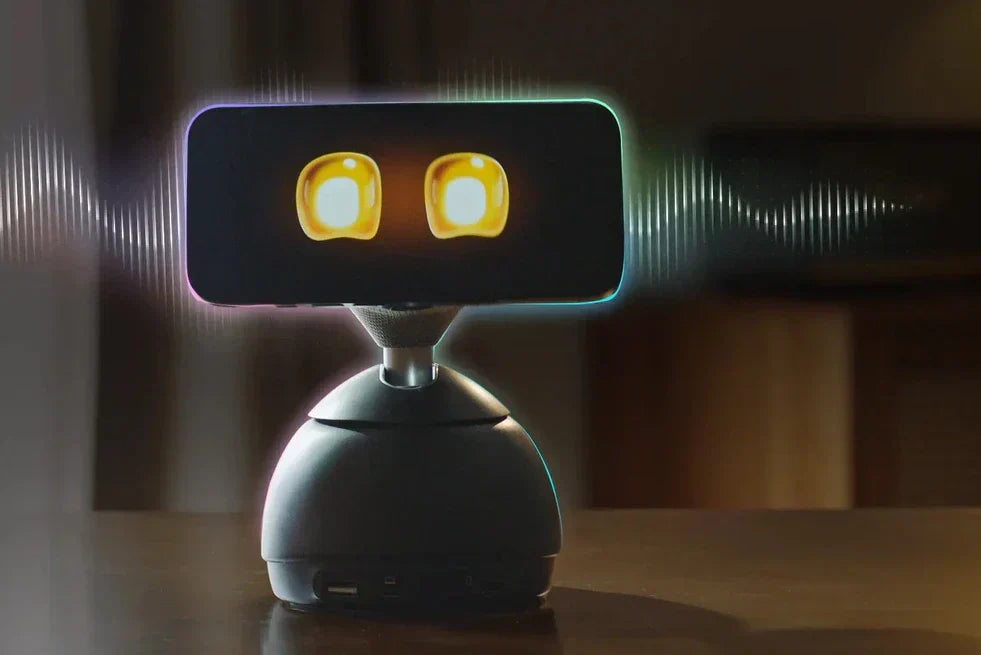
DeskMate emphasizes audio-visual multimodal perception, combining vision and sound to detect who you’re talking to and when—without a wake word.
It also claims to reduce interaction friction by eliminating a 300–500 ms silence delay and responding only when you’re actually addressing it.
That’s the difference between “AI as a feature” and “AI as a presence”: it should feel more like a natural exchange and less like operating a gadget.
3. Deep computer integration: works with your screen and workflow
DeskMate is positioned as being tightly connected to your desktop workflow via real-time clipboard and screen awareness.
It also notes Mac support, with Windows supported “via a related app,” and emphasizes “no context explaining, no app switching.”
In practical terms, this implies a more grounded kind of help: Ask about what you’re looking at and get workflow-aware responses instead of starting from scratch each time.
4. Tool ecosystem: built for everyday work
DeskMate highlights integrations aimed at real office routines, including:
Email Assistant: Summarizes emails and drafts replies through Gmail
Calendar Management: Plans, reminds, and adjusts schedules
Work Integrations: Slack for messages and information lookup
Meeting Scheduling: Coordinates Zoom meetings via Calendly and sends invitations
Automated Booking: Booking via integrations like SendGrid and Yelp
Why DeskMate makes sense at CES 2026
CES has always been where “next” becomes tangible, and CES 2026 is especially AI-heavy. Reuters notes that AI is expected to be embedded into products well beyond autos, including robots. AP likewise described AI being anchored in nearly everything at the show, with robotics and “physical AI” drawing attention.
DeskMate lands directly in that overlap:
AI that lives on your desk (not just in the cloud)
Embodied interaction (presence, timing, nonverbal cues)
Practical workflow integrations (email, calendar, Slack, meetings)
That combination is exactly what “desktop embodied AI” needs to become a category instead of a novelty.
Real-world use cases: where a desktop AI companion can actually help
Based on DeskMate’s stated capabilities, here are the workflows where a desk robot has a clear edge over a purely screen-based assistant:
Morning kickoff: email + calendar triage, summarized into priorities
Meeting prep: screen-aware Q&A and quick brief generation
Post-meeting follow-through: drafts, scheduling, and Slack follow-ups
Deep work protection: staying quiet when you’re focused, engaging when needed
Stress relief and companionship: “emotion-aware” support that feels less transactional
Conclusion
DeskMate’s CES 2026 debut signals a clear shift in how people may work with AI next: not as a tool you constantly “operate,” but as a desktop AI companion that understands context, attention, and emotion—and steps in at the right time. By combining embodied presence, multimodal perception, deep computer integration, and a growing ecosystem of everyday workplace tools, DeskMate is aiming to make AI feel less like software and more like a reliable workmate you can actually keep on your desk.
Loona DeskMate is expected to launch in May.
Lock in VIP pricing!
Enjoy pre-sale discounts!
FAQ
Is LOONA DeskMate a desktop AI companion or an office assistant?
Both. It’s positioned as an embodied desktop workmate that combines emotional interaction with everyday productivity workflows.
Does DeskMate need a wake word?
It combines vision and sound to understand who you’re talking to and when—without a wake word.
What tools does DeskMate integrate with?
DeskMate integrates with Gmail for email summaries and drafting replies, supports calendar management, connects with Slack, coordinates Zoom meetings through Calendly, and includes booking integrations for making reservations or service bookings.
LOONA Deskmate Arrives at CES 2026: A New Kind of Always-On AI Desktop Companion
January 05, 2026
LOONA Deskmate, the world’s first AI desktop companion designed to remain present in your workspace, will be showcased at CES 2026 in Las Vegas from January 6–9, 2026. Built to blend naturally into everyday desk life, LOONA Deskmate focuses on understanding attention and emotional state, quietly handling small tasks in the background and stepping in when support is needed.
Visit LOONA Deskmate at CES 2026 (Las Vegas)
Attendees can experience LOONA Deskmate in person during CES:
Dates: January 6–9, 2026
Location: Venetian Expo & Convention Center, Level 2, Halls A–D
Booth: No. 52355
What Makes LOONA Deskmate Different?
Most AI assistants live inside apps, tabs, or devices that require deliberate “open and ask” behavior. LOONA Deskmate is designed for a different pattern: always there, low interruption, and context-aware—so help feels more like a natural part of working at a desk.
Attention- and Emotion-Aware Support
LOONA Deskmate is built to recognize when you’re focused and when you may need help, aiming to reduce unnecessary interruptions while still staying available. The experience is shaped around understanding what you’re trying to do, your current state, and how you’re feeling—so assistance can be more timely and more human-centered.
Multimodal Interaction for Natural Conversations
LOONA Deskmate uses multimodal perception (including vision and audio) to support more fluid interaction at the desk—helping it respond at the right moment without forcing rigid command-style prompts.
Screen-Connected Productivity
LOONA Deskmate is designed to work alongside what you’re doing on your computer, reducing the friction of switching apps or repeatedly explaining context. This desk-first approach helps turn everyday actions—copying text, checking information, scheduling—into faster workflows.
Everyday Tools That Reduce “Busy Work”
LOONA Deskmate supports common desk tasks such as:
email assistance (summaries and drafting)
calendar and scheduling support
work communication integrations and meeting coordination
The goal is simple: less time spent on small repetitive actions, more time for the work that matters.
A CES Moment for AI That Fits Into Life
CES 2026 is often where new consumer robotics and AI interaction models get their first real-world spotlight. LOONA Deskmate stands out by focusing on long-term desk companionship rather than one-off AI queries—an approach aimed at making AI feel less like a tool you “use” and more like a presence that supports you throughout the day.